
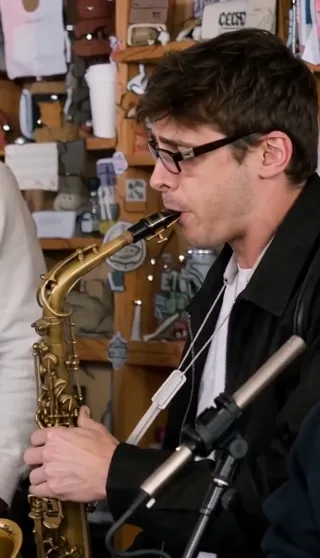
15-second full performanceAI-generated concert from five portraits, with lips synced to the music and movements synced to the sound.
What is the Outstanding Tiny Desk trend?
The format casts an unexpected lineup as a band in a small office concert inspired by Charlie Wilson’s Tiny Desk performance of “Outstanding.” The humor comes from seeing familiar faces take the performance seriously: a seated singer starts, the lead gets a close-up, and the saxophonist closes the clip.
Cast friends from your group chat, teammates or colleagues who have agreed to take part. Give the lead role to the person who always makes an entrance, or save the saxophone ending for a quiet friend.
For the source performance and more context, see the Outstanding AI trend explained.
Three ways to make the trend
| Method | What you prepare | What to expect |
|---|---|---|
| Outstanding AI | Five individual portraits | A generated concert with a set sequence and soundtrack; eligible new accounts can try the opening for free |
| CapCut template | Whatever photos or clips the chosen template requests | An edit limited to that template’s replaceable elements and effects; check export pricing |
| Film and edit it yourself | Your cast, camera and performance setup | Control over the acting and cuts, with filming and editing work |
For a template-based edit, use the Outstanding Tiny Desk CapCut guide. For a generated band from photos, follow the three steps below.
How to make an Outstanding AI video in 3 steps
1. Choose five clear photos
Choose a clear, well-lit portrait of each person, with their whole face visible. Avoid group photos, heavy blur and sunglasses. The photos can be taken separately.
Think about casting before uploading: who opens the performance, who sings the lead, and who gets the saxophone ending? Use photos of yourself or people who have agreed to take part.
2. Upload the photos and assign the roles
Open the Outstanding AI generator, sign in, and match your photos to the five labeled slots. You can add them in any order; check the final assignments before starting.
| Slot | Role in the video |
|---|---|
| Seated singer | Opens the performance at the microphone |
| Left backing singer | Appears in the opening ensemble |
| Right backing singer | Appears in the opening ensemble |
| Lead singer | Takes the vocal close-up in the middle of the video |
| Saxophonist | Appears in the closing instrument shot |
Choose portrait 9:16 for a vertical post, landscape 16:9 for a wide video, or square 1:1. The template supplies the performance direction and audio, so you do not need to write a prompt or upload music.
3. Preview or generate, then download
If your account is eligible and the preview is available, choose Try free · 4 s opening to see the seated singer and backing singers. For the full concert, choose Standard 480p or HD 720p, check the credit cost and generate the 15-second video.
When the video is ready, watch it in My creations and download the MP4 with sound. Generation times vary. If yours is still processing, check its status before starting another video.
How to try the Outstanding Tiny Desk trend for free
Eligible new accounts can try one free 4-second opening preview at 480p, subject to availability. This is one trial across the site’s video templates, rather than a separate trial for each template.
| Free opening preview | Full performance | |
|---|---|---|
| Length | 4 seconds | 15 seconds |
| People shown | Seated singer and two backing singers | All five, across separate shots |
| Resolution | 480p | Standard 480p or HD 720p |
| Payment | Free if eligible and available | Credits |
Upload all five photos for either option. The lead singer and saxophonist appear later in the performance, so they are only included in the full video. The free preview shows the opening 4 seconds. The full video recreates the complete 15-second concert with the same performance sequence and soundtrack.
If the preview is unavailable, read the message in the generator. The free Outstanding AI guide explains the account, network and daily availability checks. A CapCut edit may also be free if its template and selected assets allow free export; verify that before editing.
What does a full Outstanding Tiny Desk video cost?
Both quality options use Seedance 2.0 Fast and include the full 15-second concert:
| Quality | Credits |
|---|---|
| Standard · 480p | 100 |
| HD · 720p | 200 |
Check the cost in the generator and compare credit packs on the pricing page. The free preview shows the opening 4 seconds. The full video recreates the complete 15-second concert with the same performance sequence and soundtrack. Lip movements sync with the music, while performance and instrument movements sync with the corresponding sounds.
Photo and casting tips for a better result
- Choose photos with a clear view of the face. If someone is far from the camera, even a sharp photo may not show enough detail.
- Choose photos with the outfits you want to use. The generator uses visible clothing and accessories as references. It replaces the backgrounds, and small clothing details may change.
- Check all five slots. Swapping the lead and saxophone portraits changes who gets each close-up.
- Keep the joke in the cast and caption. The template prepares the performance; it is not a custom-lyrics or voice-cloning tool.
- Watch your cast perform before sharing. Play the finished video with sound to see the synchronized lip movements, gestures and instrument performance.
A caption such as “The group chat after finally agreeing on dinner” gives viewers context without covering the performers. Add it after downloading if you want control over its placement.
Sound and sharing your finished video
The downloaded MP4 already includes a soundtrack. The photos are used as visual references. Nobody needs to record their voice, and the generator does not clone it.
If you add another sound in CapCut, TikTok or another editor, adjust the included audio first and check the new timing. A different track may no longer match the mouth movements. Check the destination platform’s available sounds and permitted uses before posting.
Use the AI disclosure options described by TikTok when sharing realistic AI-generated video there. Ask permission before sharing someone else’s likeness, and make clear that this is a fictional performance.
Outstanding AI is independent and is not affiliated with NPR, Tiny Desk Concerts, Charlie Wilson or CapCut.
Questions about making the Outstanding Tiny Desk trend
Can I do it on my phone?
Yes. Use the browser generator, upload the photos from your device and return to My creations to download the finished file. You do not need CapCut for generation.
Can I use one group photo instead of five portraits?
You need to upload five individual portraits, one for each role. You can crop a group photo into individual portraits if each face is large and sharp enough.
Do I need to sing or record a video?
No. The prepared template supplies the concert direction, motion reference and soundtrack. Your five photos supply the cast.
Why is my free preview missing two people?
It only covers the opening. The lead singer and saxophonist appear later in the full 15-second video.
Can I edit the result in CapCut?
Yes. Import the downloaded MP4 as a normal clip to add captions or make cuts. If you want to start from a template instead, read where to find an Outstanding Tiny Desk CapCut template.
Your band starts with five photos
Pick the lead, build the band and give your cast a desk-concert moment of their own.
Try the free opening preview